library(tidyverse)
library(broom)broomの基本操作
1 broomとは
broomパッケージは,回帰分析などの統計モデルの出力を整然としたデータフレーム(tibble)に変換するためのパッケージです.Rの標準的なsummary()関数の出力はリスト形式で扱いにくいことがありますが,broomを使えばtidyverseの流儀に沿ったデータ操作が可能になります.
broomには3つの主要な関数があります.
tidy():モデルの係数や検定結果を整理するglance():モデル全体の適合度を要約するaugment():元データに予測値や残差を追加する
2 準備:回帰分析の実行
まず,例として単回帰分析を実行します.
wagedata <- read_csv("wage.csv", show_col_types = FALSE)

model <- lm(wage ~ educ, data = wagedata)summary()の出力は情報量が多いですが,プログラムで扱いにくい形式です.
summary(model)
Call:
lm(formula = wage ~ educ, data = wagedata)

Residuals:
    Min      1Q  Median      3Q     Max
-576.09 -173.36  -34.12  127.82 1686.25

Coefficients:
            Estimate Std. Error t value Pr(>|t|)
(Intercept)  183.949     23.104   7.962 2.38e-15 ***
educ          29.655      1.708  17.368  < 2e-16 ***
---
Signif. codes:  0 '***' 0.001 '**' 0.01 '*' 0.05 '.' 0.1 ' ' 1

Residual standard error: 250.7 on 3008 degrees of freedom
Multiple R-squared:  0.09114,   Adjusted R-squared:  0.09084
F-statistic: 301.6 on 1 and 3008 DF,  p-value: < 2.2e-16
3 tidy():係数の整理
tidy()は,各係数の推定値,標準誤差,検定統計量,p値をtibbleとして返します.
tidy(model)# A tibble: 2 × 5
term estimate std.error statistic p.value
<chr> <dbl> <dbl> <dbl> <dbl>
1 (Intercept) 184. 23.1 7.96 2.38e-15
2 educ 29.7 1.71 17.4 1.83e-64パイプ演算子と組み合わせることもできます.
lm(wage ~ educ, data = wagedata) %>%
  tidy()
# A tibble: 2 × 5
term estimate std.error statistic p.value
<chr> <dbl> <dbl> <dbl> <dbl>
1 (Intercept) 184. 23.1 7.96 2.38e-15
2 educ 29.7 1.71 17.4 1.83e-64conf.int = TRUEを指定すると,信頼区間も出力されます.
model %>%
  tidy(conf.int = TRUE)
# A tibble: 2 × 7
term estimate std.error statistic p.value conf.low conf.high
<chr> <dbl> <dbl> <dbl> <dbl> <dbl> <dbl>
1 (Intercept) 184. 23.1 7.96 2.38e-15 139. 229.
2 educ 29.7 1.71 17.4 1.83e-64 26.3 33.0信頼水準を変更するには,conf.levelを指定します.
model %>%
  tidy(conf.int = TRUE, conf.level = 0.99)
# A tibble: 2 × 7
term estimate std.error statistic p.value conf.low conf.high
<chr> <dbl> <dbl> <dbl> <dbl> <dbl> <dbl>
1 (Intercept) 184. 23.1 7.96 2.38e-15 124. 243.
2 educ 29.7 1.71 17.4 1.83e-64 25.3 34.14 glance():モデル全体の要約
glance()は,決定係数\(R^2\)やAICなど,モデル全体の適合度指標を1行のtibbleとして返します.
glance(model)# A tibble: 1 × 12
r.squared adj.r.squared sigma statistic p.value df logLik AIC BIC
<dbl> <dbl> <dbl> <dbl> <dbl> <dbl> <dbl> <dbl> <dbl>
1 0.0911 0.0908 251. 302. 1.83e-64 1 -20898. 41803. 41821.
# ℹ 3 more variables: deviance <dbl>, df.residual <int>, nobs <int>5 augment():予測値と残差の追加
augment()は,元のデータに予測値(.fitted)や残差(.resid)などの列を追加したtibbleを返します.
augment(model) %>%
  head()
# A tibble: 6 × 8
wage educ .fitted .resid .hat .sigma .cooksd .std.resid
<dbl> <dbl> <dbl> <dbl> <dbl> <dbl> <dbl> <dbl>
1 548. 7 392. 156. 0.00215 251. 0.000421 0.625
2 481. 12 540. -58.8 0.000406 251. 0.0000112 -0.235
3 721. 12 540. 181. 0.000406 251. 0.000106 0.723
4 250. 11 510. -260. 0.000570 251. 0.000307 -1.04
5 729. 12 540. 189. 0.000406 251. 0.000116 0.755
6 500. 12 540. -39.8 0.000406 251. 0.00000513 -0.159.fittedは予測値\(\hat{Y}_i\),.residは残差\(\hat{e}_i = Y_i - \hat{Y}_i\)に対応します.
augment()の出力を使って,たとえば残差のヒストグラムを描くことができます.
augment(model) %>%
  ggplot(aes(x = .resid)) +
  geom_histogram(bins = 30)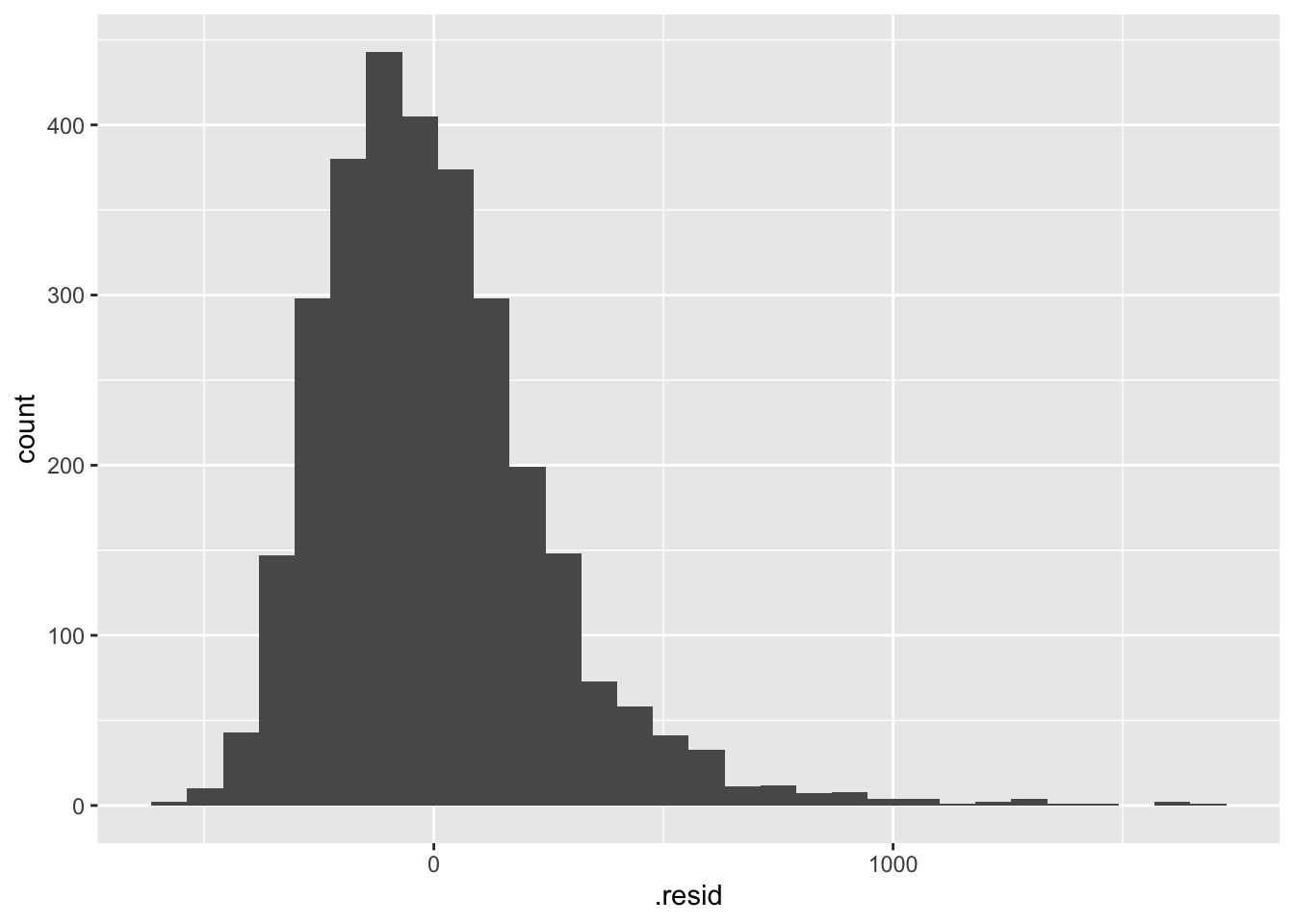
6 一連の操作をパイプでつなげる
broomの関数はパイプ演算子と相性が良いため,データの読み込みから推定結果の整理までを一気に記述できます.
read_csv("wage.csv", show_col_types = FALSE) %>%
  lm(wage ~ educ + exper, data = .) %>%
  tidy(conf.int = TRUE)
# A tibble: 3 × 7
term estimate std.error statistic p.value conf.low conf.high
<chr> <dbl> <dbl> <dbl> <dbl> <dbl> <dbl>
1 (Intercept) -376. 37.8 -9.94 6.54e- 23 -450. -301.
2 educ 55.1 2.14 25.7 4.72e-132 50.9 59.3
3 exper 25.1 1.38 18.2 4.10e- 70 22.4 27.9ここで,data = .の.は,パイプで渡されたオブジェクトを意味します.lm()関数の第1引数はモデル式であり,データフレームではないため,明示的にdata = .と指定する必要があります.